Can Canva Files Be Used for Custom Plastic Bag Printing?
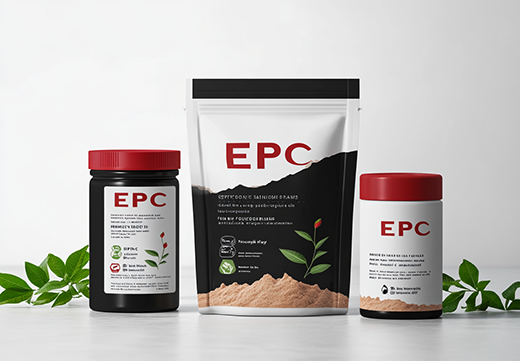
Recently, I worked with a customer who had just started his business and needed custom plastic bag packaging for his product.
After we discussed the bag size, material, printing, and other details, he decided to order a sample first.
The next step was to provide the packaging artwork.
A few days later, he sent me several images and asked:
“Can this design be used for printing?”
I explained that artwork for custom plastic bag printing should normally be editable and clear enough for production. Ideally, the design should be prepared as a vector file, while any photographic or bitmap images used in the artwork should have a resolution of around 300 dpi at the final printing size.
This helps ensure that the printed text, logos, lines, and images remain clear.
After several discussions, the customer told me that he had not hired a professional designer. He had created the files himself using Canva.
The images he sent could not be used directly as production artwork. However, he was willing to accept a design similar to his original concept, so I told him that our designer might be able to help.
We then began preparing the custom packaging design for him.
The first version has now been mostly confirmed. Only a few details need to be adjusted before the final artwork can be approved.
Many startup brands face the same problem. They have a clear idea of how they want their custom plastic bags to look, but they are unsure what type of artwork the packaging manufacturer needs.
Here are the main points to understand before sending your design to a plastic bag supplier.
Why Are Canva Images Often Not Ready for Plastic Bag Printing?
Canva is useful for creating a visual concept.
It allows startup brands to experiment with:
- Logos
- Product names
- Colors
- Images
- Text placement
- General packaging layouts
However, the image previews or ordinary exported images created in Canva may not be suitable for direct production.
A plastic bag manufacturer usually needs more than a picture showing what the bag should look like.
The production team may need to:
- Adjust the artwork to the correct bag dimensions
- Add bleed areas
- Move text away from sealing areas
- Check the position of the zipper
- Adjust the design around the bottom or side gusset
- Separate different design elements
- Check image resolution
- Prepare the file for the printing process
If the customer only provides a flat JPG or PNG image, these elements may not be independently editable.
The Canva design can still be a useful visual reference, but the supplier may need to recreate or adjust it before it becomes print-ready artwork.
1. Provide a Suitable Artwork Format
For custom printed pouches, suitable artwork formats may include:
- AI
- CDR
- PSD
The exact format depends on how the design was created and the production workflow of the plastic bag manufacturer.
AI and CDR files are commonly used for vector artwork.
PSD files can be useful when the design contains editable image layers.
An editable PDF may also be accepted when the design elements have been prepared correctly.
The important point is not only the file extension.
The supplier must be able to open, check, and adjust the artwork for production.
Simply saving a low-resolution image as a PDF does not automatically make it suitable for printing.
2. The Artwork Should Be Editable
One of the most important requirements is that the design should be editable.
A flat image combines the logo, text, background, and other elements into one picture.
This makes it difficult for the packaging supplier to correct individual parts of the design.
For example, the supplier may need to:
- Move the product name
- Adjust the logo size
- Correct the barcode position
- Add a bleed area
- Change the bag dimensions
- Keep important text away from the heat-seal area
- Adjust artwork for the gusset
- Correct small production details
If the artwork is editable, these changes are much easier to complete.
This also improves communication between the customer, designer, and plastic bag manufacturer.
3. Convert Text to Outlines or Curves
Before sending the final artwork to your plastic bag supplier, the text should normally be converted to outlines or curves.
Different software uses different terms:
- Adobe Illustrator usually uses “Create Outlines”
- CorelDRAW usually uses “Convert to Curves”
The purpose is the same.
Once the text has been converted, the letters become graphic shapes rather than depending on the original font file.
This helps avoid problems such as:
- Missing fonts
- Replaced fonts
- Incorrect spacing
- Changed text appearance
- Unexpected printing errors
A font that is installed on the customer’s computer may not be installed on the supplier’s computer.
Converting the text to outlines or curves helps preserve the approved appearance.
However, the wording should be checked carefully before this step because outlined text is more difficult to edit later.
4. Use High-Resolution Images
Some custom packaging designs include photographs, textures, product images, or other JPG elements.
These images should be clear enough at the final printing size.
We normally recommend using images with a resolution of approximately 300 dpi.
Low-resolution images may look acceptable on a phone or computer screen but become blurry or pixelated after printing.
This problem is especially common when customers use:
- Images downloaded from websites
- Screenshots
- Small social media images
- Enlarged product photos
- Low-quality background pictures
The image should be checked at the actual size used in the plastic bag design.
A small image may have 300 dpi at its original size, but its effective resolution will decrease if it is enlarged significantly in the artwork.
A Picture of the Design Is Not the Same as Print-Ready Artwork
Customers sometimes send a JPG or PNG image and say:
“This is exactly how I want the bag to look.”
This is helpful because it allows the plastic bag supplier to understand the customer’s design concept.
However, a design reference and a print-ready file are not the same thing.
A design reference shows:
- The expected layout
- The preferred colors
- The logo position
- The general visual style
- The information to include
Print-ready artwork must also meet production requirements.
It needs to work with:
- The final bag dimensions
- Sealing areas
- Zipper position
- Tear notches
- Bottom or side gussets
- Cutting tolerances
- Bleed areas
- The selected printing process
This is why a packaging design may need professional adjustment even when the customer is satisfied with how it looks in Canva.
What Can You Do If You Do Not Have a Designer?
Not having a professional designer does not necessarily mean that your custom plastic bag project cannot continue.
You can still use Canva or another simple design tool to communicate your idea.
Try to provide the packaging supplier with:
- Your Canva design or exported reference image
- Your logo in the best available quality
- All text that must appear on the bag
- Product information
- Preferred colors
- Product photographs
- Examples of packaging styles you like
- The required bag dimensions
- Any barcode or QR code
- Regulatory or warning information
The supplier can then evaluate whether the existing file can be adjusted or whether the artwork needs to be recreated.
In the case of our customer, he accepted a design similar to his Canva concept.
Our designer used his original idea as a reference and helped prepare a production-ready version.
The first design version has already been mostly confirmed, and only a few details still need to be modified.
What Should You Send to a Plastic Bag Supplier?
Before requesting custom plastic bag printing, prepare as much of the following information as possible:
Bag specifications
Provide:
- Finished width
- Finished height
- Bottom or side gusset
- Zipper requirements
- Tear notch requirements
- Hang hole requirements
- Material or finish preferences
Editable artwork
Preferred formats include:
- AI
- CDR
- PSD
- Editable PDF
Outlined text
Convert fonts to outlines or curves after all wording has been checked and approved.
High-resolution images
Use clear images, preferably around 300 dpi at the final printed size.
Complete packaging content
Provide all necessary:
- Product names
- Logos
- Ingredients
- Instructions
- Barcodes
- Warning information
- Contact information
Supplying complete information at the beginning can reduce repeated changes and help the sample-making process move more efficiently.
Need help preparing artwork for your custom printed pouches?
Send us your Canva design, packaging dimensions, logo, text, and product information. We can review the files and determine what needs to be adjusted before printing.
Website: www.custompackagingprint.com
Email: [email protected]
WhatsApp: +86 173 3600 3921
 Can Kraft Paper Make My Plastic Pouch More Recyclable?
 Can You Do a Child-Proof Bag?Custom Child-Resistant Pouches